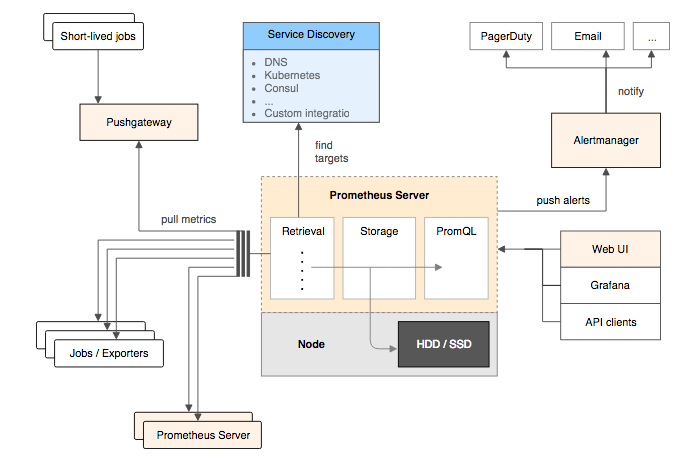
Prometheus + Grafana 打造实时全链路监控系统

序言

  人非圣贤,孰能无过?
  对程序而言,同样如此,即使一个产品经历了一系列的开发测试工作,在此过程中又遇到并解决了成百上千个 Bug,最终交付给客户并正式上线了,后期还是可能会出现一些问题。
  这些问题的产生,可能是客户进行了不符合逻辑的异常操作引起的,也可能是程序代码原先判断逻辑本就存在问题,还有可能是某个应用或服务器资源(CPU、内存、磁盘、网络)出现异常了。但不管怎样,是问题就应当给客户解决,不然客户不满意了,公司的企业形象降低了,若后期还有合作,说不定就泡汤了呢!合作泡汤了,说不定整个业务部门就给你优化掉,程序员就没班上了呢!!!
  作为程序员,为了防止被优化的意外发生,还是老老实实的帮客户解决问题吧!
  那么,怎么去解决问题呢?
  作为一个程序员,接到一个产品问题,想的应该不是解决,而是分析问题的类型,待分析出问题的类型后,才去解决问题。
  那么,问题大概又可以分为哪几种类型呢?
  笔者认为,其大致可以分为以下三种:

  • ① 理解问题:做的需求不符合客户的预期效果,客户不买帐,那么,互相扯皮或者重新做~
  • ② 代码问题:程序存在 Bug,这又进一步可以分为三种:
    • 前端 Bug:前端程序问题,页面设计不合理或与后端对接不正确
    • 后端 Bug:后端程有问题,逻辑错误或重大 Bug 导致应用的宕机,那么让后端同学修复
    • 运维 Bug:服务器配置问题,让实施同学(通常被后端同学替代…)解决
  • ③ 服务器问题:CPU、内存、磁盘,网络资源引起的问题

  现在,我们得到了一个结论——问题的存在形式是多种多样的,因此我们遇到问题不能局限在某一块思考(后端开发不能碰到问题就想的是看日志,得明确是后端问题才去看日志),因为不同的问题解决方案也不一样。

  由于只有在大致分析出问题的类型后,才能尝试去解决问题:

  • 针对问题 ①,我们有时可以甩锅给产品同学——你的需求不对呀,我肯定做错呀(叉腰:理直气壮),当然有时也需要自己接锅(自己理解不到位)
  • 针对问题 ②,通常需要看线上日志来定位问题的产生原因,尝试复现 Bug
  • 针对问题 ③,需要去看服务器某段运行时间里资源情况(注意哦,是观测服务器在某段运行时间里资源情况,因为线上出问题了,肯定是之前某个时间点出的问题,我们仅仅观察出错后的资源占比情况不一定能找出问题所在)

  那么,又该如何去观察服务器在某段运行时间里的资源情况是怎样的呢?
  这个时候,就需要布置一套监控系统来辅助我们程序员观察分析了。

选择哪种监控系统?

  在《SRE: Google 运维解密》一书中指出,监控系统需要能够有效的支持白盒监控和黑盒监控。通过白盒能够了解其内部的实际运行状态,通过对监控指标的观察能够预判可能出现的问题,从而对潜在的不确定因素进行优化。而黑盒监控,常见的如 HTTP 探针,TCP 探针等,可以在系统或者服务在发生故障时能够快速通知相关的人员进行处理。通过建立完善的监控体系,从而达到以下目的:

  • 长期趋势分析:通过对监控样本数据的持续收集和统计,对监控指标进行长期趋势分析。例如,通过对磁盘空间增长率的判断,我们可以提前预测在未来什么时间节点上需要对资源进行扩容。
  • 对照分析:两个版本的系统运行资源使用情况的差异如何?在不同容量情况下系统的并发和负载变化如何?通过监控能够方便的对系统进行跟踪和比较。
  • 告警:当系统出现或者即将出现故障时,监控系统需要迅速反应并通知管理员,从而能够对问题进行快速的处理或者提前预防问题的发生,避免出现对业务的影响。
  • 故障分析与定位:当问题发生后,需要对问题进行调查和处理。通过对不同监控监控以及历史数据的分析,能够找到并解决根源问题。
  • 数据可视化:通过可视化仪表盘能够直接获取系统的运行状态、资源使用情况、以及服务运行状态等直观的信息。

  对于常用的监控系统,如 Nagios、Zabbix 的用户而言,往往并不能很好的解决上述问题

  Prometheus 是一个开源的完整监控解决方案,其对传统监控系统的测试和告警模型进行了彻底的颠覆,形成了基于中央化的规则计算、统一分析和告警的新模型。 相比于传统监控系统Prometheus具有以下优点:

  • 易于管理
  • 监控服务的内部运行状态
  • 强大的数据模型
  • 强大的查询语言 PromQL
  • 高效
  • 可扩展
  • 易于集成
  • 可视化
  • 开放性

监控系统的角色组成

  一个完整的全链路监控系统,通常而言需要以下角色组件互相配合工作:

  • ① 客户端:确认要监控的指标数据,进行埋点暴露工作
  • ② 收集器:定时拉取(或客户端推送)埋点暴露的指标数据,存储到相关数据库
  • ③ 告警中心:监控数据出现异常时发送通知(短信、邮件等)告知相关处理人员
  • ④ UI 界面:
    • 将指标查询计算后,将其以图表方式展现,供程序人员分析
    • 配置告警任务,对特定指标进行阈值配置,超过限制以短信邮件等形式通知维护人员

  Prometheus 同样遵循此种架构,通过以下组件架构协调工作:

  • Prometheus Server:Prometheus 组件中的核心部分,负责实现对监控数据的获取,存储以及查询
  • Exporters:将监控数据采集的端点通过 HTTP 服务的形式暴露给 Prometheus Server,Prometheus Server 通过访问该 Exporter 提供的 Endpoint 端点,即可获取到需要采集的监控数据
  • Prometheus Server + AlertManager:告警处理中心,定义告警规则,规则触发后经过处理发送通知给用户
  • Grafana:UI 界面

Prometheus 架构

Exporters —— 客户端组件

  我们需要监控什么样的指标数据?

  • MySQL 应用的健康情况,Buffer Pool?
  • Reids 应用的健康情况,内存使用量?
  • Linux 服务器的 CPU,磁盘容量,网络,内存情况?
  • Java 应用的健康情况,接口的调用情况?

  它们也都有可能,那么自然需要为不同的服务适配不同的客户端去获取不同的指标信息,因此,已有前行者为我们开发好了对应的客户端工具,此类工具被称为 Exporter。

  Exporter 将监控数据采集的端点通过 HTTP 服务的形式暴露给 Prometheus Server,Prometheus Server 通过访问该 Exporter 提供的 Endpoint 端点,即可获取到需要采集的监控数据。

  一般来说可以将 Exporter 分为两类:

  • 直接采集:这一类 Exporter 直接内置了对 Prometheus 监控的支持,比如 cAdvisor,Kubernetes,Etcd,Gokit 等,都直接内置了用于向 Prometheus 暴露监控数据的端点
  • 间接采集:间接采集,原有监控目标并不直接支持 Prometheus,因此我们需要通过 Prometheus 提供的 Client Library 编写该监控目标的监控采集程序。例如: Mysql Exporter,JMX Exporter,Consul Exporter 等

  我们可能需要监控什么服务?
  MySQL?Redis?Linux 服务器?还是 Java 应用?
  它们都有可能。

  比如:

  • node_exporter:主机监控客户端
  • redis_export:Redis 监控客户端
  • mysql_export:MySQL 监控客户端

node_exporter

  node_exporter用来监控主机信息,每台机器上都要部署一个该组件

1
2
3
4
5
6
tar -zxvf node_exporter-1.3.1.linux-amd64.tar.gz
mv node_exporter-1.3.1.linux-amd64 node_exporter
cd node_exporter/
nohup ./node_exporter > /dev/null 2>&1 &
# 端口冲突时切换以下命令(默认 9100)
# nohup ./node_exporter --web.listen-address=":9101" &

  启动成功后,可通过访问http://{ip}:9100/metrics查看监控信息,有监控指标输出即为部署成功。

  推荐中文看板 ID:8919 或 11174

redis_export

  redis_export 用来监控 redis 服务器的信息,每台部署 redis 的机器上都要部署一个该组件:

1
2
3
4
5
6
tar -zxvf redis_exporter-v1.37.0.linux-amd64.tar.gz
mv redis_exporter-v1.37.0.linux-amd64 redis_exporter
cd redis_exporter/
nohup ./redis_exporter > /dev/null 2>&1 &
# 端口冲突时切换以下命令(默认 9121)
# nohup ./redis_exporter --web.listen-address=":9122" > /dev/null 2>&1 &

  启动成功后,可通过访问http://{ip}:9122/metrics查看监控信息,有监控指标输出即为部署成功。

  推荐中文看板 ID:17507

mysql_export

  mysql_export用来监控 MySQL 服务器的信息,每台部署 MySQL 的机器上都要部署一个该组件

1
2
3
tar -xf mysqld_exporter-0.12.1.linux-amd64.tar.gz
cd mysqld_exporter-0.12.1.linux-amd64
vim my.cnf

  进入目录,修改my.cnf文件,填写 MySQL 数据库的用户名、密码

1
2
3
4
[client]
host=xx.xx.xx.xx
user=root
password=123

  之后通过以下命令启动:

1
nohup ./mysqld_exporter --config.my-cnf=my.cnf --web.listen-address=":9104" > /dev/null 2>&1 &

  启动成功后,可通过访问 http://{ip}:9104/metrics 查看监控信息,有监控指标输出即为部署成功。

  推荐看板ID:7362 17320(中文推荐)

  下载地址

kafka_export

  kafka_export用来监控 kafka 服务器信息,每台部署 kafka 的机器上都要部署一个该组件

1
2
3
4
tar -xf kafka_exporter-1.2.0.linux-amd64.tar.gz
rm -f kafka_exporter-1.2.0.linux-amd64.tar.gz
cd kafka_exporter-1.2.0.linux-amd64/
nohup ./kafka_exporter --kafka.server=192.168.1.5:9092 --web.listen-address=":9308" &

  启动成功后,可通过访问 http://{ip}:9308/metrics 查看监控信息,有监控指标输出即为部署成功。

  推荐中文看板 ID:12326、11285、12460

elasticsearh_export

  elasticsearch_export 用来监控 es 服务器信息,每台部署 es 的机器上都要部署一个该组件

  解压【elasticsearch_exporter-1.0.4rc1.linux-amd64.zip】压缩文件到指定目录
  通过修改 elasticsearch_export.sh 脚本来配置要监控的es机器,或者是修改端口号

1
2
3
4
tar -xf elasticsearch_exporter-1.0.4rc1.linux-amd64.tar.gz
rm -f elasticsearch_exporter-1.0.4rc1.linux-amd64.tar.gz
cd elasticsearch_exporter-1.0.4rc1.linux-amd64/
nohup ./elasticsearch_exporter --web.listen-address="9119" --es.uri http://192.168.6.112:9200 > /dev/null 2>&1 &

  启动成功后,可通过访问 http://{ip}:9109/metrics 查看监控信息,有监控指标输出即为部署成功。

Java 客户端——Spring Boot Actuator

  Spring Boot 的 Actuator 模块可以帮助我们监控和管理 Spring Boot 应用
  那么,为了达到此目的,Actuator 又会如何做呢?
  简单来讲,Actuator 模块内部会对启动的应用进行以下四个动作:

  • ① 查看特定信息;
  • ② 收集特定信息;
  • ③ 暴露特定信息;(核心)
  • ④ 处理特定信息(偶尔使用)

  这些被 Actuator 查看并被收集的特定信息一般包括:

  • 健康情况:应用的存活情况
  • 指标:应用的指标信息,收集后主要供其他监控系统(比如 Prometheus)使用
  • logger :应用程序的日志级别,允许热修改哦
  • HTTP 跟踪:存储应用最近 100 个请求-响应交换的跟踪信息

  在收集到这些信息后,Actuator 模块会将其采集并暴露给外界。
  对外界而言,必定需要通过某种方式来访问这些信息,Actuator 则提供了两种方式:

  • HTTP
  • JMX

快速入门

  若想使用 Actuator 模块,只需在 Spring Boot 项目中的pom.xml文件加入以下依赖即可:

1
2
3
4
5
<!-- 监控 -->
<dependency>
<groupId>org.springframework.boot</groupId>
<artifactId>spring-boot-starter-actuator</artifactId>
</dependency>

  之后便可通过http://ip:port/actuator访问。

Endpoints

  简介中提到过,Actuator 会暴露收集的一些信息,供外界通过 HTTP 或 JMX 访问。
  在 Actuator 中,这些被暴露的不同类别的信息被不同的 Endpoints(以下简称端点)统领。

种类

  不同的端点会提供不同的信息,比如说:

  • /health 端点: 提供了关于应用健康情况的一些基础信息
  • /metrics端点:提供了一些有用的应用程序指标(JVM 内存使用、系统 CPU 使用等)

  这些 Actuator 模块自带的端点被称之为原生端点。
  根据端点的作用,可以将其分为三大类:

  • 应用配置类:获取应用程序中加载的应用配置、环境变量、自动化配置报告等与 Spring Boot 应用密切相关的配置类信息
  • 度量指标类:获取应用程序运行过程中用于监控的度量指标,比如:内存信息、线程池信息、HTTP 请求统计等。
  • 操作控制类:提供了对应用的关闭等操作类功能。

列表

  下表详细对目前 Actuator 的端点进行了一个说明:

端点 说明
auditevent 显示应用暴露的审计事件(比如认证进入、订单失败)
beans 显示应用程序中所有 Spring bean 的完整列表
caches 暴露可用的缓存
info 显示应用的基本信息
health 显示应用的健康状态
metrics 显示应用多样的度量信息
loggers 显示和修改配置的 loggers
logfile 返回 logfile 中的内容(若 logging.file 或 logging.path 被设置)
httptrace 显示 HTTP 足迹,最近 100 个 HTTP 请求与响应
env 显示当前的环境特性
flyway 显示数据库迁移路径的详细信息
shutdown 优雅地逐步关闭应用
mappings 显示所有的@RequestMapping路径
scheduledtasks 显示应用中的调度任务
threaddump 显示线程状态信息
heapdump 返回一个 GZip 压缩的 JVM 堆 dump
prometheus 以 Prometheus 服务器可以抄袭的格式公开指标,需要额外的 micrometer-registry-Prometheus 依赖

启用与暴露

  Endpoints 存在启用与暴露开关。

如何启用 Endpoints?

  默认情况下,除了关闭之外的所有端点都是启用的。
  若要配置端点的启用,需使用management.endpoint.<id>.enabled启用属性。
  下面的示例启用了关闭端点:

1
management.endpoint.shutdown.enabled=true

如何暴露 Endpoints?

  因为 Endpoints 可能包含敏感信息,所以应该仔细考虑何时公开它们。

默认暴露

  下表显示了默认暴露的内置端点:

ID JMX Web
auditevents
beans
caches
conditions
configprops
env
flyway
health
heapdump
httptrace
info
integrationgraph
jolokia
logfile
loggers
liquibase
metrics
mappings
prometheus
scheduledtasks
sessions
shutdown
threaddump
自定义暴露

  若要更改公开的端点,可使用 include 和 exclude 属性

属性 默认值
management.endpoints.jmx.exposure.exclude
management.endpoints.jmx.exposure.include *
management.endpoints.web.exposure.exclude
management.endpoints.web.exposure.include info, health

  简单来讲:

  • 可使用端点 id 列表配置 include 和 exclude 属性(多个用,隔开)
  • include 属性列出公开的端点的 id
  • exclude 属性列出不应公开的端点的 id
  • exclude 属性优先于 include 属性

  例如,要停止通过 JMX 公开所有端点并仅公开 health 和 info 端点,请使用以下属性:

1
management.endpoints.jmx.exposure.include=health,info

  *可用于选择所有端点。
  例如,若要通过 HTTP 公开除了 env 和 beans 端点以外的所有端点,需这么配置:

1
2
management.endpoints.web.exposure.include=*
management.endpoints.web.exposure.exclude=env,beans
路径

  Actuator 默认所有的端点路径都在/actuator/*,当然若有需要此路径也可进行如下定制化:

1
management.endpoints.web.base-path=/minitor

  设置完重启应用后,再次访问地址就会变成/minitor/*

配置注意

  需要注意的是,*在 YAML 文件中存在特殊含义,因此若想包含(或排除)所有端点,请确保添加引号,如下例所示:

1
2
3
4
5
management:
endpoints:
web:
exposure:
include: "*"

常用 Endpoints

  在 Actuator 中,提供了大量的端点,但我们并不需要去了解所有的端点,掌握一些常用的即可。
  那么,下面就对这些常用的进行一一介绍。

health

  /health端点会聚合你程序的健康指标,来检查程序的健康情况。
  端点公开的应用健康信息则取决于下面的属性配置:

1
management.endpoint.health.show-details=never

  该属性可以使用以下值之一进行配置:

属性值 说明
never 只显示应用的状态(up 或 down)不展示详细信息,默认值
when-authorized 将详细信息展示给通过认证的用户。授权的角色可以通过management.endpoint.health.roles配置
always 对所有用户暴露详细信息

  一般保持默认即可。

metrics

  /metrics端点用于展示当前应用的各类重要度量指标,比如:内存信息、线程信息、垃圾回收信息、tomcat、数据库连接池等。

1
2
3
4
5
6
7
8
9
10
11
12
13
14
15
{
"names": [
"tomcat.threads.busy",
"jvm.threads.states",
"jdbc.connections.active",
"jvm.gc.memory.promoted",
"http.server.requests",
"hikaricp.connections.max",
"hikaricp.connections.min",
"jvm.memory.used",
"jvm.gc.max.data.size",
"jdbc.connections.max",
...
]
}

  不同于 1.x,Actuator 在这个界面看不到具体的指标信息,只是展示了一个指标列表。
  为了获取到某个指标的详细信息,我们可以请求具体的指标信息,像这样:

1
http://localhost:8080/actuator/metrics/{MetricName}
loggers


info

  /info端点可以用来展示你程序的信息。我理解过来就是一些程序的基础信息。并且你可以按照自己的需求在配置文件application.properties中个性化配置(默认情况下,该端点只会返回一个空的json内容):

1
2
3
4
5
6
7
8
info.app.name=actuator-test-demo
info.app.encoding=UTF-8
info.app.java.source=1.8
info.app.java.target=1.8
# 在 maven 项目中你可以直接用下列方式引用 maven properties 的值
# info.app.encoding=@project.build.sourceEncoding@
# info.app.java.source=@java.version@
# info.app.java.target=@java.version@

  启动项目,访问http://localhost:8080/actuator/info

1
2
3
4
5
6
7
8
9
10
{
"app": {
"encoding": "UTF-8",
"java": {
"source": "1.8.0_131",
"target": "1.8.0_131"
},
"name": "actuator-test-demo"
}
}
beans

  /beans端点会返回 Spring 容器中所有 bean 的别名、类型、是否单例、依赖等信息。

heapdump

  访问:http://localhost:8080/actuator/heapdump 会自动生成一个 JVM 的堆文件 heapdump。我们可以使用 JDK 自带的 Jvm 监控工具 VisualVM 打开此文件查看内存快照。

threaddump

  threaddump 主要展示了线程名、线程ID、线程的状态、是否等待锁资源、线程堆栈等信息。
  此端点方便我们在日常定位问题的时候查看线程的情况,但可能查看起来不太直观。
  访问http://localhost:8080/actuator/threaddump返回如下

shutdown

  shutdown端点属于操作控制类端点,可以优雅关闭 Spring Boot 应用。
  该功能默认是关闭的,若想启用,需要在配置文件中进行如下配置:

1
management.endpoint.shutdown.enabled=true

  如何使用它呢?
  当我们启动 Demo 项目,可向http://localhost:8080/actuator/shutdown发起POST请求。
  请求后将返回如下信息:

1
{    "message": "Shutting down, bye..."}

  最后应用程序将被关闭。

  由于开放关闭应用的操作本身是一件非常危险的事,所以不是特别必要的话,不要开启这个端点,若想在线上使用,最好对其加入一定的保护机制,比如:定制 Actuator 的端点路径、整合 Spring Security 进行安全校验 等。

注意点

  对端点而言:

  • 每一个端点都可以通过配置来单独禁用或者启动
  • 不同于 Actuator 1.x,Actuator 2.x 的大多数端点默认被禁掉
  • Actuator 2.x 中的默认端点增加了/actuator前缀
  • Actuator 2.x 默认暴露的两个端点为/actuator/health/actuator/info

JVM 看板

    看板ID:

  • 4701(官方 JVM)
  • 6756(Java)
  • 14430(推荐)
  • 16107(中文)
  • 13625(中文超全)
  • 12900(推荐 SpringBoot)
1
2
3
# instance
label_values(jvm_memory_used_bytes{application="$application"}, instance)
label_values(application)

Prometheus Server —— 收集器组件

  如何收集存储各服务客户端的指标,这依赖 Prometheus Server。

  Prometheus Server 是 Prometheus 组件中的核心部分,除了负责实现对监控数据的获取,存储,还支持特殊规则语法方便查询。

  下面为部分配置说明:

1
2
3
4
5
6
7
8
9
10
11
12
13
14
15
16
17
18
19
20
21
22
23
24
25
26
27
28
29
30
31
32
33
34
35
36
37
38
39
40
41
42
43
44
45
scrape_configs:
# 主机监控
- job_name: "node_export"
static_configs:
- targets:
- "10.57.12.19:9100"
- "10.57.12.20:9100"
- "10.57.12.21:9100"
- "10.57.12.22:9100"
- "10.57.12.23:9100"
- "10.57.12.24:9100"
# MySQL 监控
- job_name: "mysql_export"
static_configs:
- targets:
- "10.57.12.21:9104"
- "10.57.12.22:9104"
# Redis 监控
- job_name: "redis_export"
static_configs:
- targets: ["10.57.12.20:9121"]

# Java 应用监控
- job_name: "gateway"
metrics_path: "/actuator/prometheus"
static_configs:
- targets:
- "10.57.12.20:8080"
- "10.57.12.23:8080"
- "10.57.12.24:8080"
- job_name: "auth"
metrics_path: "/actuator/prometheus"
static_configs:
- targets:
- "10.57.12.20:9200"
- "10.57.12.23:9200"
- "10.57.12.24:9200"

- job_name: "sys"
metrics_path: "/actuator/prometheus"
static_configs:
- targets:
- "10.57.12.20:9201"
- "10.57.12.23:9201"
- "10.57.12.24:9201"

Prometheus + AlertManager —— 告警组件

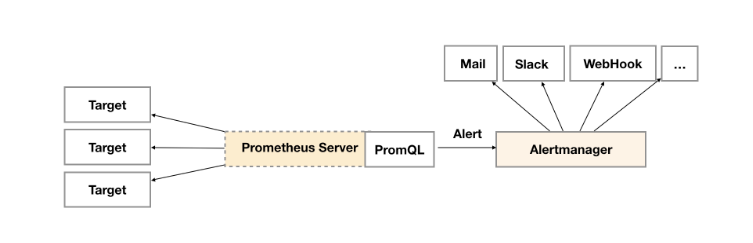
  告警功能在 Prometheus 的架构中,被划分成两个独立的部分,如下图所示:
Prometheus—Alert

  通过在 Prometheus 中定义 AlertRule(告警规则),Prometheus 会周期性的对告警规则进行计算,如果满足告警规则的触发条件,就会向 Alertmanager 发送告警信息。

告警规则

  在 Prometheus 中一条告警规则主要由以下几部分组成:

  • 告警规则名称:为告警规则命名,对于命名而言,建议能够直接表达出该告警的主要内容
  • 告警规则定义:告警规则实际上主要由 PromQL 进行定义,其实际意义是当表达式(PromQL)查询结果持续多长时间(During)后出发告警
  • 告警规则分组:对一组相关的告警进行统一定义

  以上定义,都是通过 YAML 文件进行统一管理。

告警规则文件的定义

  以下是一个告警规则文件的示例:

1
2
3
4
5
6
7
8
9
10
11
12
13
14
15
16
17
18
19
groups:
- name: example
rules:
# 告警规则的名称
- alert: HighErrorRate
# 基于 PromQL 表达式告警触发条件,用于计算是否有时间序列满足该条件
expr: job:request_latency_seconds:mean5m{job="myjob"} > 0.5
# 评估等待时间,可选参数。用于表示只有当触发条件持续一段时间后才发送告警。在等待期间新产生告警的状态为 pending
for: 10m
# 自定义标签,允许用户指定要附加到告警上的一组附加标签
labels:
# 指定告警级别,存在 warning, critical 和 emergency 三种等级。严重等级依次递增
severity: critical
# 指定一组附加信息,比如用于描述告警详细信息的文字等,此内容在告警产生时会一同作为参数发送到 Alertmanager
annotations:
# 概要信息
summary: High request latency
# 详细信息
description: description info

如何引入告警规则文件

  为了能够让 Prometheus 能够启用定义的告警规则,我们需要在 Prometheus 的全局配置文件中通过rule_files指定一组告警规则文件的访问路径,Prometheus 启动后会自动扫描这些路径下规则文件中定义的内容,并且根据这些规则计算是否向外部发送通知:

1
2
rule_files:
- /etc/prometheus/rules/*.rules

  默认情况下Prometheus会每分钟对这些告警规则进行计算,如果用户想定义自己的告警计算周期,则可以通过evaluation_interval来覆盖默认的计算周期:

1
2
global:
[ evaluation_interval: <duration> | default = 1m ]

告警规则触发后的告警处理

  Alertmanager 作为一个独立的组件,负责接收并处理来自 Prometheus Server (也可以是其它的客户端程序)的告警信息。

  Alertmanager 主要用于对告警信息进行进一步的处理,比如当接收到大量重复告警时能够消除重复的告警信息,同时对告警信息进行分组并且路由到正确的通知方。

  Prometheus 内置了对邮件,Slack 等多种通知方式的支持,同时还支持与 Webhook 的集成,以支持更多定制化的场景。

1
2
3
4
5
6
7
8
9
10
11
12
13
14
15
16
17
18
19
20
21
22
23
24
25
26
27
global:
resolve_timeout: 5m

# 根据标签匹配,确定当前告警应该如何处理
route:
# 告警应该根据那些标签进行分组,不分组可以指定
group_by: ['alertname']
# 同一组的告警发出前要等待多少秒,这个是为了把更多的告警一个批次发出去
group_wait: 10s
# 同一组的多批次告警间隔多少秒后,才能发出
group_interval: 10s
# 重复的告警要等待多久后才能再次发出去
repeat_interval: 1h
# 设置接收对象,必须匹配 receivers 中的一个才能发送告警
receiver: 'web.hook'

# 接收对象是一个抽象的概念,一般配合告警路由使用,可以配置多种类型,比如:邮箱、钉钉、飞书、Webhook 等
receivers:
- name: 'web.hook'
webhook_configs:
- url: 'http://127.0.0.1:5001/'
inhibit_rules:
- source_match:
severity: 'critical'
target_match:
severity: 'warning'
equal: ['alertname', 'dev', 'instance']

常见的监控指标

内存不足

  可用内存低于阈值 10% 就会触发告警。

1
2
3
4
5
6
7
8
- alert: HostOutOfMemory
expr: node_memory_MemAvailable_bytes / node_memory_MemTotal_bytes * 100 < 10
for: 2m
labels:
severity: warning
annotations:
summary: Host out of memory (instance {{ $labels.instance }})
description: "请注意!主机内存不足,当前使用率: {{ $value }}\n LABELS = {{ $labels }}"

磁盘空间不足

1
2
3
4
5
6
7
8
- alert: Host out of disk space
expr: (node_filesystem_avail_bytes * 100) / node_filesystem_size_bytes < 10 and {mountpoint= "/"}
for: 2m
labels:
severity: warning
annotations:
summary: Host out of disk space (instance {{ $labels.instance }})
description: "请注意!主机磁盘空间不足,当前使用率: {{ $value }}\n LABELS = {{ $labels }}"

Grafana —— UI 展示组件

  如何选择一款功能齐全且界面炫酷的前端监控界面,这可以使用 Grafana。

Docker 快速部署

  一般使用 Docker 方式快速部署 Prometheus + Grafana,我们分别配置。

前置配置-时间同步

1
2
yum install -y ntpdate
ntpdate time3.aliyun.com

Prometheus 配置

1
2
3
4
5
6
7
8
9
10
11
12
13
14
15
16
17
18
19
20
21
22
23
24
25
26
27
28
29
30
31
32
33
34
35
cd /data/software/monitor/
mkdir -p prometheus/config
mkdir -p prometheus/data
sudo chmod -R 777 prometheus/
cat >> /data/software/monitor/prometheus/config/prometheus.yml <<EOF
# my global config
global:
scrape_interval: 15s # Set the scrape interval to every 15 seconds. Default is every 1 minute.
evaluation_interval: 15s # Evaluate rules every 15 seconds. The default is every 1 minute.
# scrape_timeout is set to the global default (10s).

# Alertmanager configuration
alerting:
alertmanagers:
- static_configs:
- targets:
# 这里使用 ip
- "192.168.1.1:9093"

# Load rules once and periodically evaluate them according to the global 'evaluation_interval'.
rule_files:
- "/etc/prometheus/rules/*.rules"

# A scrape configuration containing exactly one endpoint to scrape:
# Here it's Prometheus itself.
scrape_configs:
# The job name is added as a label `job=<job_name>` to any timeseries scraped from this config.
- job_name: "prometheus"

# metrics_path defaults to '/metrics'
# scheme defaults to 'http'.

static_configs:
- targets: ["192.168.1.1:9090"]
EOF

Grafana 配置

1
2
mkdir -p grafana/data
mkdir -p grafana/config
1
2
3
4
5
6
7
8
9
10
11
12
13
14
15
16
17
18
19
20
21
22
23
24
25
26
27
28
29
30
31
32
33
34
35
36
37
38
39
40
41
42
43
44
45
46
47
48
49
50
51
52
53
54
55
56
57
58
59
60
61
62
63
64
65
66
67
68
69
70
71
72
73
74
75
76
77
78
79
80
81
82
83
84
85
86
87
88
89
90
91
92
93
94
95
96
97
98
99
100
101
102
103
104
105
106
107
108
109
110
111
112
113
114
115
116
117
118
119
120
121
122
123
124
125
126
127
128
129
130
131
132
133
134
135
136
137
138
139
140
141
142
143
144
145
146
147
148
149
150
151
152
153
154
155
156
157
158
159
160
161
162
163
164
165
166
167
168
169
170
171
172
173
174
175
176
177
178
179
180
181
182
183
184
185
186
187
188
189
190
191
192
193
194
195
196
197
198
199
200
201
202
203
204
205
206
207
208
209
210
211
212
213
214
215
216
217
218
219
220
221
222
223
224
225
226
227
228
229
230
231
232
233
234
235
236
237
238
239
240
241
242
243
244
245
246
247
248
249
250
251
252
253
254
255
256
257
258
259
260
261
262
263
264
265
266
267
268
269
270
271
272
273
274
275
276
277
278
279
280
281
282
283
284
285
286
287
288
289
290
291
292
293
294
295
296
297
298
299
300
301
302
303
304
305
306
307
308
309
310
311
312
313
314
315
316
317
318
319
320
321
322
323
324
325
326
327
328
329
330
331
332
333
334
335
336
337
338
339
340
341
342
343
344
345
346
347
348
349
350
351
352
353
354
355
356
357
358
359
360
361
362
363
364
365
366
367
368
369
370
371
372
373
374
375
376
377
378
379
380
381
382
383
384
385
386
387
388
389
390
391
392
393
394
395
396
397
398
399
400
401
402
403
404
405
406
407
408
409
410
411
412
413
414
415
416
417
418
419
420
421
422
423
424
425
426
427
428
429
430
431
432
433
434
435
436
437
438
439
440
441
442
443
444
445
446
447
448
449
450
451
452
453
454
455
456
457
458
459
460
461
462
463
464
465
466
467
468
469
470
471
472
473
474
475
476
477
478
479
480
481
482
483
484
485
486
487
488
489
490
491
492
493
494
495
496
497
498
499
500
501
502
503
504
505
506
507
508
509
510
511
512
513
514
515
516
517
518
519
520
521
522
523
524
525
526
527
528
529
530
531
532
533
534
535
536
537
538
539
540
541
542
543
544
545
546
547
548
549
550
551
552
553
554
555
556
557
558
559
560
561
562
563
564
565
566
567
568
569
570
571
572
573
574
575
576
577
578
579
580
581
582
583
584
585
586
587
588
589
590
591
592
593
594
595
596
597
598
599
600
601
602
603
604
605
606
607
608
609
610
611
612
613
614
615
616
617
618
619
620
621
622
623
624
625
626
627
628
629
630
631
632
633
634
635
636
637
638
639
640
641
642
643
644
645
646
647
648
649
650
651
652
653
654
655
656
657
658
659
660
661
662
663
664
665
666
667
668
669
670
671
672
673
674
675
676
677
678
679
680
681
682
683
684
685
686
687
688
689
690
691
692
693
694
695
696
697
698
699
700
701
702
703
704
705
706
707
708
709
710
711
712
713
714
715
716
717
718
719
720
721
722
723
724
725
726
727
728
729
730
731
732
733
734
735
736
737
738
739
740
741
742
743
744
745
746
747
748
749
750
751
752
753
754
755
756
757
758
759
760
761
762
763
764
765
766
767
768
769
770
771
772
773
774
775
776
777
778
779
780
781
782
783
784
785
786
787
788
789
790
791
792
793
794
795
796
797
798
799
800
801
802
803
804
805
806
807
808
809
810
811
812
813
814
815
816
817
818
819
820
821
822
823
824
825
826
827
828
829
830
831
832
833
834
835
836
837
838
839
840
841
842
843
844
845
846
847
848
849
850
851
852
853
854
855
856
857
858
859
860
861
862
863
864
865
866
867
868
869
870
871
872
873
874
875
876
877
878
879
880
881
882
883
884
885
886
887
888
889
890
891
892
893
894
895
896
897
898
899
900
901
902
903
904
905
906
907
908
909
910
911
912
913
914
915
916
917
918
919
920
921
922
923
924
925
926
927
928
929
930
931
932
933
934
935
936
937
938
939
940
941
942
943
944
945
946
947
948
949
950
951
952
953
954
955
956
957
958
959
960
961
962
963
964
965
966
967
968
969
970
971
972
973
974
975
976
977
978
979
980
981
982
983
984
985
986
987
988
989
990
991
992
993
994
995
996
997
998
999
1000
1001
1002
1003
1004
1005
1006
1007
1008
1009
1010
1011
1012
1013
1014
1015
1016
1017
1018
1019
1020
1021
1022
1023
1024
1025
1026
1027
1028
1029
1030
1031
1032
1033
1034
1035
1036
1037
1038
1039
1040
1041
1042
1043
1044
1045
1046
1047
1048
1049
1050
1051
1052
1053
1054
1055
1056
1057
1058
1059
1060
1061
1062
1063
1064
1065
1066
1067
1068
1069
1070
1071
1072
1073
1074
1075
1076
1077
1078
1079
1080
1081
1082
1083
1084
1085
1086
1087
1088
1089
1090
1091
1092
1093
1094
1095
1096
1097
1098
1099
1100
1101
1102
1103
1104
1105
1106
1107
1108
1109
1110
1111
1112
1113
1114
1115
1116
1117
1118
1119
1120
1121
1122
1123
1124
1125
1126
1127
1128
1129
1130
1131
1132
1133
1134
1135
1136
1137
1138
1139
1140
1141
1142
1143
1144
1145
1146
1147
1148
1149
1150
1151
1152
1153
1154
1155
1156
1157
1158
1159
1160
1161
1162
1163
1164
1165
1166
1167
1168
1169
1170
1171
1172
1173
1174
1175
1176
1177
1178
1179
1180
1181
1182
1183
1184
1185
1186
1187
1188
1189
1190
1191
1192
1193
1194
1195
1196
1197
1198
1199
1200
1201
1202
1203
1204
1205
1206
1207
1208
1209
1210
1211
1212
1213
1214
1215
1216
1217
1218
1219
1220
1221
1222
1223
1224
1225
1226
1227
1228
1229
1230
1231
1232
1233
vim /data/software/monitor/grafana/config/grafana.ini
##################### Grafana Configuration Example #####################
#
# Everything has defaults so you only need to uncomment things you want to
# change

# possible values : production, development
;app_mode = production

# instance name, defaults to HOSTNAME environment variable value or hostname if HOSTNAME var is empty
;instance_name = ${HOSTNAME}

# force migration will run migrations that might cause dataloss
;force_migration = false

#################################### Paths ####################################
[paths]
# Path to where grafana can store temp files, sessions, and the sqlite3 db (if that is used)
;data = /var/lib/grafana

# Temporary files in `data` directory older than given duration will be removed
;temp_data_lifetime = 24h

# Directory where grafana can store logs
;logs = /var/log/grafana

# Directory where grafana will automatically scan and look for plugins
;plugins = /var/lib/grafana/plugins

# folder that contains provisioning config files that grafana will apply on startup and while running.
;provisioning = conf/provisioning

#################################### Server ####################################
[server]
# Protocol (http, https, h2, socket)
;protocol = http

# The ip address to bind to, empty will bind to all interfaces
;http_addr =

# The http port to use
;http_port = 3000

# The public facing domain name used to access grafana from a browser
;domain = localhost

# Redirect to correct domain if host header does not match domain
# Prevents DNS rebinding attacks
;enforce_domain = false

# The full public facing url you use in browser, used for redirects and emails
# If you use reverse proxy and sub path specify full url (with sub path)
;root_url = %(protocol)s://%(domain)s:%(http_port)s/

# Serve Grafana from subpath specified in `root_url` setting. By default it is set to `false` for compatibility reasons.
;serve_from_sub_path = false

# Log web requests
;router_logging = false

# the path relative working path
;static_root_path = public

# enable gzip
;enable_gzip = false

# https certs & key file
;cert_file =
;cert_key =

# Unix socket path
;socket =

# CDN Url
;cdn_url =

# Sets the maximum time using a duration format (5s/5m/5ms) before timing out read of an incoming request and closing idle connections.
# `0` means there is no timeout for reading the request.
;read_timeout = 0

#################################### Database ####################################
[database]
# You can configure the database connection by specifying type, host, name, user and password
# as separate properties or as on string using the url properties.

# Either "mysql", "postgres" or "sqlite3", it's your choice
;type = sqlite3
;host = 127.0.0.1:3306
;name = grafana
;user = root
# If the password contains # or ; you have to wrap it with triple quotes. Ex """#password;"""
;password =

# Use either URL or the previous fields to configure the database
# Example: mysql://user:secret@host:port/database
;url =

# For "postgres" only, either "disable", "require" or "verify-full"
;ssl_mode = disable

# Database drivers may support different transaction isolation levels.
# Currently, only "mysql" driver supports isolation levels.
# If the value is empty - driver's default isolation level is applied.
# For "mysql" use "READ-UNCOMMITTED", "READ-COMMITTED", "REPEATABLE-READ" or "SERIALIZABLE".
;isolation_level =

;ca_cert_path =
;client_key_path =
;client_cert_path =
;server_cert_name =

# For "sqlite3" only, path relative to data_path setting
;path = grafana.db

# Max idle conn setting default is 2
;max_idle_conn = 2

# Max conn setting default is 0 (mean not set)
;max_open_conn =

# Connection Max Lifetime default is 14400 (means 14400 seconds or 4 hours)
;conn_max_lifetime = 14400

# Set to true to log the sql calls and execution times.
;log_queries =

# For "sqlite3" only. cache mode setting used for connecting to the database. (private, shared)
;cache_mode = private

# For "mysql" only if migrationLocking feature toggle is set. How many seconds to wait before failing to lock the database for the migrations, default is 0.
;locking_attempt_timeout_sec = 0

################################### Data sources #########################
[datasources]
# Upper limit of data sources that Grafana will return. This limit is a temporary configuration and it will be deprecated when pagination will be introduced on the list data sources API.
;datasource_limit = 5000

#################################### Cache server #############################
[remote_cache]
# Either "redis", "memcached" or "database" default is "database"
;type = database

# cache connectionstring options
# database: will use Grafana primary database.
# redis: config like redis server e.g. `addr=127.0.0.1:6379,pool_size=100,db=0,ssl=false`. Only addr is required. ssl may be 'true', 'false', or 'insecure'.
# memcache: 127.0.0.1:11211
;connstr =

#################################### Data proxy ###########################
[dataproxy]

# This enables data proxy logging, default is false
;logging = false

# How long the data proxy waits to read the headers of the response before timing out, default is 30 seconds.
# This setting also applies to core backend HTTP data sources where query requests use an HTTP client with timeout set.
;timeout = 30

# How long the data proxy waits to establish a TCP connection before timing out, default is 10 seconds.
;dialTimeout = 10

# How many seconds the data proxy waits before sending a keepalive probe request.
;keep_alive_seconds = 30

# How many seconds the data proxy waits for a successful TLS Handshake before timing out.
;tls_handshake_timeout_seconds = 10

# How many seconds the data proxy will wait for a server's first response headers after
# fully writing the request headers if the request has an "Expect: 100-continue"
# header. A value of 0 will result in the body being sent immediately, without
# waiting for the server to approve.
;expect_continue_timeout_seconds = 1

# Optionally limits the total number of connections per host, including connections in the dialing,
# active, and idle states. On limit violation, dials will block.
# A value of zero (0) means no limit.
;max_conns_per_host = 0

# The maximum number of idle connections that Grafana will keep alive.
;max_idle_connections = 100

# How many seconds the data proxy keeps an idle connection open before timing out.
;idle_conn_timeout_seconds = 90

# If enabled and user is not anonymous, data proxy will add X-Grafana-User header with username into the request, default is false.
;send_user_header = false

# Limit the amount of bytes that will be read/accepted from responses of outgoing HTTP requests.
;response_limit = 0

# Limits the number of rows that Grafana will process from SQL data sources.
;row_limit = 1000000

#################################### Analytics ####################################
[analytics]
# Server reporting, sends usage counters to stats.grafana.org every 24 hours.
# No ip addresses are being tracked, only simple counters to track
# running instances, dashboard and error counts. It is very helpful to us.
# Change this option to false to disable reporting.
;reporting_enabled = true

# The name of the distributor of the Grafana instance. Ex hosted-grafana, grafana-labs
;reporting_distributor = grafana-labs

# Set to false to disable all checks to https://grafana.com
# for new versions of grafana. The check is used
# in some UI views to notify that a grafana update exists.
# This option does not cause any auto updates, nor send any information
# only a GET request to https://raw.githubusercontent.com/grafana/grafana/main/latest.json to get the latest version.
;check_for_updates = true

# Set to false to disable all checks to https://grafana.com
# for new versions of plugins. The check is used
# in some UI views to notify that a plugin update exists.
# This option does not cause any auto updates, nor send any information
# only a GET request to https://grafana.com to get the latest versions.
;check_for_plugin_updates = true

# Google Analytics universal tracking code, only enabled if you specify an id here
;google_analytics_ua_id =

# Google Analytics 4 tracking code, only enabled if you specify an id here
;google_analytics_4_id =

# Google Tag Manager ID, only enabled if you specify an id here
;google_tag_manager_id =

# Rudderstack write key, enabled only if rudderstack_data_plane_url is also set
;rudderstack_write_key =

# Rudderstack data plane url, enabled only if rudderstack_write_key is also set
;rudderstack_data_plane_url =

# Rudderstack SDK url, optional, only valid if rudderstack_write_key and rudderstack_data_plane_url is also set
;rudderstack_sdk_url =

# Rudderstack Config url, optional, used by Rudderstack SDK to fetch source config
;rudderstack_config_url =

# Controls if the UI contains any links to user feedback forms
;feedback_links_enabled = true

#################################### Security ####################################
[security]
# disable creation of admin user on first start of grafana
;disable_initial_admin_creation = false

# default admin user, created on startup
;admin_user = admin

# default admin password, can be changed before first start of grafana, or in profile settings
;admin_password = admin

# default admin email, created on startup
;admin_email = admin@localhost

# used for signing
;secret_key = SW2YcwTIb9zpOOhoPsMm

# current key provider used for envelope encryption, default to static value specified by secret_key
;encryption_provider = secretKey.v1

# list of configured key providers, space separated (Enterprise only): e.g., awskms.v1 azurekv.v1
;available_encryption_providers =

# disable gravatar profile images
;disable_gravatar = false

# data source proxy whitelist (ip_or_domain:port separated by spaces)
;data_source_proxy_whitelist =

# disable protection against brute force login attempts
;disable_brute_force_login_protection = false

# set to true if you host Grafana behind HTTPS. default is false.
;cookie_secure = false

# set cookie SameSite attribute. defaults to `lax`. can be set to "lax", "strict", "none" and "disabled"
;cookie_samesite = lax

# set to true if you want to allow browsers to render Grafana in a <frame>, <iframe>, <embed> or <object>. default is false.
;allow_embedding = false

# Set to true if you want to enable http strict transport security (HSTS) response header.
# HSTS tells browsers that the site should only be accessed using HTTPS.
;strict_transport_security = false

# Sets how long a browser should cache HSTS. Only applied if strict_transport_security is enabled.
;strict_transport_security_max_age_seconds = 86400

# Set to true if to enable HSTS preloading option. Only applied if strict_transport_security is enabled.
;strict_transport_security_preload = false

# Set to true if to enable the HSTS includeSubDomains option. Only applied if strict_transport_security is enabled.
;strict_transport_security_subdomains = false

# Set to true to enable the X-Content-Type-Options response header.
# The X-Content-Type-Options response HTTP header is a marker used by the server to indicate that the MIME types advertised
# in the Content-Type headers should not be changed and be followed.
;x_content_type_options = true

# Set to true to enable the X-XSS-Protection header, which tells browsers to stop pages from loading
# when they detect reflected cross-site scripting (XSS) attacks.
;x_xss_protection = true

# Enable adding the Content-Security-Policy header to your requests.
# CSP allows to control resources the user agent is allowed to load and helps prevent XSS attacks.
;content_security_policy = false

# Set Content Security Policy template used when adding the Content-Security-Policy header to your requests.
# $NONCE in the template includes a random nonce.
# $ROOT_PATH is server.root_url without the protocol.
;content_security_policy_template = """script-src 'self' 'unsafe-eval' 'unsafe-inline' 'strict-dynamic' $NONCE;object-src 'none';font-src 'self';style-src 'self' 'unsafe-inline' blob:;img-src * data:;base-uri 'self';connect-src 'self' grafana.com ws://$ROOT_PATH wss://$ROOT_PATH;manifest-src 'self';media-src 'none';form-action 'self';"""

# Controls if old angular plugins are supported or not. This will be disabled by default in future release
;angular_support_enabled = true

# List of additional allowed URLs to pass by the CSRF check, separated by spaces. Suggested when authentication comes from an IdP.
;csrf_trusted_origins = example.com

# List of allowed headers to be set by the user, separated by spaces. Suggested to use for if authentication lives behind reverse proxies.
;csrf_additional_headers =

[security.encryption]
# Defines the time-to-live (TTL) for decrypted data encryption keys stored in memory (cache).
# Please note that small values may cause performance issues due to a high frequency decryption operations.
;data_keys_cache_ttl = 15m

# Defines the frequency of data encryption keys cache cleanup interval.
# On every interval, decrypted data encryption keys that reached the TTL are removed from the cache.
;data_keys_cache_cleanup_interval = 1m

#################################### Snapshots ###########################
[snapshots]
# snapshot sharing options
;external_enabled = true
;external_snapshot_url = https://snapshots.raintank.io
;external_snapshot_name = Publish to snapshots.raintank.io

# Set to true to enable this Grafana instance act as an external snapshot server and allow unauthenticated requests for
# creating and deleting snapshots.
;public_mode = false

# remove expired snapshot
;snapshot_remove_expired = true

#################################### Dashboards History ##################
[dashboards]
# Number dashboard versions to keep (per dashboard). Default: 20, Minimum: 1
;versions_to_keep = 20

# Minimum dashboard refresh interval. When set, this will restrict users to set the refresh interval of a dashboard lower than given interval. Per default this is 5 seconds.
# The interval string is a possibly signed sequence of decimal numbers, followed by a unit suffix (ms, s, m, h, d), e.g. 30s or 1m.
;min_refresh_interval = 5s

# Path to the default home dashboard. If this value is empty, then Grafana uses StaticRootPath + "dashboards/home.json"
;default_home_dashboard_path =

#################################### Users ###############################
[users]
# disable user signup / registration
;allow_sign_up = true

# Allow non admin users to create organizations
;allow_org_create = true

# Set to true to automatically assign new users to the default organization (id 1)
;auto_assign_org = true

# Set this value to automatically add new users to the provided organization (if auto_assign_org above is set to true)
;auto_assign_org_id = 1

# Default role new users will be automatically assigned (if disabled above is set to true)
;auto_assign_org_role = Viewer

# Require email validation before sign up completes
;verify_email_enabled = false

# Background text for the user field on the login page
;login_hint = email or username
;password_hint = password

# Default UI theme ("dark" or "light")
;default_theme = dark

# Default locale (supported IETF language tag, such as en-US)
;default_locale = en-US

# Path to a custom home page. Users are only redirected to this if the default home dashboard is used. It should match a frontend route and contain a leading slash.
;home_page =

# External user management, these options affect the organization users view
;external_manage_link_url =
;external_manage_link_name =
;external_manage_info =

# Viewers can edit/inspect dashboard settings in the browser. But not save the dashboard.
;viewers_can_edit = false

# Editors can administrate dashboard, folders and teams they create
;editors_can_admin = false

# The duration in time a user invitation remains valid before expiring. This setting should be expressed as a duration. Examples: 6h (hours), 2d (days), 1w (week). Default is 24h (24 hours). The minimum supported duration is 15m (15 minutes).
;user_invite_max_lifetime_duration = 24h

# Enter a comma-separated list of users login to hide them in the Grafana UI. These users are shown to Grafana admins and themselves.
; hidden_users =

[auth]
# Login cookie name
;login_cookie_name = grafana_session

# The maximum lifetime (duration) an authenticated user can be inactive before being required to login at next visit. Default is 7 days (7d). This setting should be expressed as a duration, e.g. 5m (minutes), 6h (hours), 10d (days), 2w (weeks), 1M (month). The lifetime resets at each successful token rotation.
;login_maximum_inactive_lifetime_duration =

# The maximum lifetime (duration) an authenticated user can be logged in since login time before being required to login. Default is 30 days (30d). This setting should be expressed as a duration, e.g. 5m (minutes), 6h (hours), 10d (days), 2w (weeks), 1M (month).
;login_maximum_lifetime_duration =

# How often should auth tokens be rotated for authenticated users when being active. The default is each 10 minutes.
;token_rotation_interval_minutes = 10

# Set to true to disable (hide) the login form, useful if you use OAuth, defaults to false
;disable_login_form = false

# Set to true to disable the sign out link in the side menu. Useful if you use auth.proxy or auth.jwt, defaults to false
;disable_signout_menu = false

# URL to redirect the user to after sign out
;signout_redirect_url =

# Set to true to attempt login with OAuth automatically, skipping the login screen.
# This setting is ignored if multiple OAuth providers are configured.
;oauth_auto_login = false

# OAuth state max age cookie duration in seconds. Defaults to 600 seconds.
;oauth_state_cookie_max_age = 600

# Skip forced assignment of OrgID 1 or 'auto_assign_org_id' for social logins
;oauth_skip_org_role_update_sync = false

# limit of api_key seconds to live before expiration
;api_key_max_seconds_to_live = -1

# Set to true to enable SigV4 authentication option for HTTP-based datasources.
;sigv4_auth_enabled = false

# Set to true to enable verbose logging of SigV4 request signing
;sigv4_verbose_logging = false

# Set to true to enable Azure authentication option for HTTP-based datasources.
;azure_auth_enabled = false

#################################### Anonymous Auth ######################
[auth.anonymous]
# enable anonymous access
;enabled = false

# specify organization name that should be used for unauthenticated users
;org_name = Main Org.

# specify role for unauthenticated users
;org_role = Viewer

# mask the Grafana version number for unauthenticated users
;hide_version = false

#################################### GitHub Auth ##########################
[auth.github]
;enabled = false
;allow_sign_up = true
;client_id = some_id
;client_secret = some_secret
;scopes = user:email,read:org
;auth_url = https://github.com/login/oauth/authorize
;token_url = https://github.com/login/oauth/access_token
;api_url = https://api.github.com/user
;allowed_domains =
;team_ids =
;allowed_organizations =
;role_attribute_path =
;role_attribute_strict = false
;allow_assign_grafana_admin = false

#################################### GitLab Auth #########################
[auth.gitlab]
;enabled = false
;allow_sign_up = true
;client_id = some_id
;client_secret = some_secret
;scopes = api
;auth_url = https://gitlab.com/oauth/authorize
;token_url = https://gitlab.com/oauth/token
;api_url = https://gitlab.com/api/v4
;allowed_domains =
;allowed_groups =
;role_attribute_path =
;role_attribute_strict = false
;allow_assign_grafana_admin = false

#################################### Google Auth ##########################
[auth.google]
;enabled = false
;allow_sign_up = true
;client_id = some_client_id
;client_secret = some_client_secret
;scopes = https://www.googleapis.com/auth/userinfo.profile https://www.googleapis.com/auth/userinfo.email
;auth_url = https://accounts.google.com/o/oauth2/auth
;token_url = https://accounts.google.com/o/oauth2/token
;api_url = https://www.googleapis.com/oauth2/v1/userinfo
;allowed_domains =
;hosted_domain =

#################################### Grafana.com Auth ####################
[auth.grafana_com]
;enabled = false
;allow_sign_up = true
;client_id = some_id
;client_secret = some_secret
;scopes = user:email
;allowed_organizations =

#################################### Azure AD OAuth #######################
[auth.azuread]
;name = Azure AD
;enabled = false
;allow_sign_up = true
;client_id = some_client_id
;client_secret = some_client_secret
;scopes = openid email profile
;auth_url = https://login.microsoftonline.com/<tenant-id>/oauth2/v2.0/authorize
;token_url = https://login.microsoftonline.com/<tenant-id>/oauth2/v2.0/token
;allowed_domains =
;allowed_groups =
;role_attribute_strict = false
;allow_assign_grafana_admin = false

#################################### Okta OAuth #######################
[auth.okta]
;name = Okta
;enabled = false
;allow_sign_up = true
;client_id = some_id
;client_secret = some_secret
;scopes = openid profile email groups
;auth_url = https://<tenant-id>.okta.com/oauth2/v1/authorize
;token_url = https://<tenant-id>.okta.com/oauth2/v1/token
;api_url = https://<tenant-id>.okta.com/oauth2/v1/userinfo
;allowed_domains =
;allowed_groups =
;role_attribute_path =
;role_attribute_strict = false
;allow_assign_grafana_admin = false

#################################### Generic OAuth ##########################
[auth.generic_oauth]
;enabled = false
;name = OAuth
;allow_sign_up = true
;client_id = some_id
;client_secret = some_secret
;scopes = user:email,read:org
;empty_scopes = false
;email_attribute_name = email:primary
;email_attribute_path =
;login_attribute_path =
;name_attribute_path =
;id_token_attribute_name =
;auth_url = https://foo.bar/login/oauth/authorize
;token_url = https://foo.bar/login/oauth/access_token
;api_url = https://foo.bar/user
;teams_url =
;allowed_domains =
;team_ids =
;allowed_organizations =
;role_attribute_path =
;role_attribute_strict = false
;groups_attribute_path =
;team_ids_attribute_path =
;tls_skip_verify_insecure = false
;tls_client_cert =
;tls_client_key =
;tls_client_ca =
;use_pkce = false
;auth_style =
;allow_assign_grafana_admin = false

#################################### Basic Auth ##########################
[auth.basic]
;enabled = true

#################################### Auth Proxy ##########################
[auth.proxy]
;enabled = false
;header_name = X-WEBAUTH-USER
;header_property = username
;auto_sign_up = true
;sync_ttl = 60
;whitelist = 192.168.1.1, 192.168.2.1
;headers = Email:X-User-Email, Name:X-User-Name
# Non-ASCII strings in header values are encoded using quoted-printable encoding
;headers_encoded = false
# Read the auth proxy docs for details on what the setting below enables
;enable_login_token = false

#################################### Auth JWT ##########################
[auth.jwt]
;enabled = true
;header_name = X-JWT-Assertion
;email_claim = sub
;username_claim = sub
;jwk_set_url = https://foo.bar/.well-known/jwks.json
;jwk_set_file = /path/to/jwks.json
;cache_ttl = 60m
;expected_claims = {"aud": ["foo", "bar"]}
;key_file = /path/to/key/file
;role_attribute_path =
;role_attribute_strict = false
;auto_sign_up = false
;url_login = false
;allow_assign_grafana_admin = false

#################################### Auth LDAP ##########################
[auth.ldap]
;enabled = false
;config_file = /etc/grafana/ldap.toml
;allow_sign_up = true
# prevent synchronizing ldap users organization roles
;skip_org_role_sync = false

# LDAP background sync (Enterprise only)
# At 1 am every day
;sync_cron = "0 1 * * *"
;active_sync_enabled = true

#################################### AWS ###########################
[aws]
# Enter a comma-separated list of allowed AWS authentication providers.
# Options are: default (AWS SDK Default), keys (Access && secret key), credentials (Credentials field), ec2_iam_role (EC2 IAM Role)
; allowed_auth_providers = default,keys,credentials

# Allow AWS users to assume a role using temporary security credentials.
# If true, assume role will be enabled for all AWS authentication providers that are specified in aws_auth_providers
; assume_role_enabled = true

#################################### Azure ###############################
[azure]
# Azure cloud environment where Grafana is hosted
# Possible values are AzureCloud, AzureChinaCloud, AzureUSGovernment and AzureGermanCloud
# Default value is AzureCloud (i.e. public cloud)
;cloud = AzureCloud

# Specifies whether Grafana hosted in Azure service with Managed Identity configured (e.g. Azure Virtual Machines instance)
# If enabled, the managed identity can be used for authentication of Grafana in Azure services
# Disabled by default, needs to be explicitly enabled
;managed_identity_enabled = false

# Client ID to use for user-assigned managed identity
# Should be set for user-assigned identity and should be empty for system-assigned identity
;managed_identity_client_id =

#################################### Role-based Access Control ###########
[rbac]
;permission_cache = true
#################################### SMTP / Emailing ##########################
[smtp]
;enabled = false
;host = localhost:25
;user =
# If the password contains # or ; you have to wrap it with triple quotes. Ex """#password;"""
;password =
;cert_file =
;key_file =
;skip_verify = false
;from_address = admin@grafana.localhost
;from_name = Grafana
# EHLO identity in SMTP dialog (defaults to instance_name)
;ehlo_identity = dashboard.example.com
# SMTP startTLS policy (defaults to 'OpportunisticStartTLS')
;startTLS_policy = NoStartTLS

[emails]
;welcome_email_on_sign_up = false
;templates_pattern = emails/*.html, emails/*.txt
;content_types = text/html

#################################### Logging ##########################
[log]
# Either "console", "file", "syslog". Default is console and file
# Use space to separate multiple modes, e.g. "console file"
;mode = console file

# Either "debug", "info", "warn", "error", "critical", default is "info"
;level = info

# optional settings to set different levels for specific loggers. Ex filters = sqlstore:debug
;filters =

# For "console" mode only
[log.console]
;level =

# log line format, valid options are text, console and json
;format = console

# For "file" mode only
[log.file]
;level =

# log line format, valid options are text, console and json
;format = text

# This enables automated log rotate(switch of following options), default is true
;log_rotate = true

# Max line number of single file, default is 1000000
;max_lines = 1000000

# Max size shift of single file, default is 28 means 1 << 28, 256MB
;max_size_shift = 28

# Segment log daily, default is true
;daily_rotate = true

# Expired days of log file(delete after max days), default is 7
;max_days = 7

[log.syslog]
;level =

# log line format, valid options are text, console and json
;format = text

# Syslog network type and address. This can be udp, tcp, or unix. If left blank, the default unix endpoints will be used.
;network =
;address =

# Syslog facility. user, daemon and local0 through local7 are valid.
;facility =

# Syslog tag. By default, the process' argv[0] is used.
;tag =

[log.frontend]
# Should Sentry javascript agent be initialized
;enabled = false

# Defines which provider to use, default is Sentry
;provider = sentry

# Sentry DSN if you want to send events to Sentry.
;sentry_dsn =

# Custom HTTP endpoint to send events captured by the Sentry agent to. Default will log the events to stdout.
;custom_endpoint = /log

# Rate of events to be reported between 0 (none) and 1 (all), float
;sample_rate = 1.0

# Requests per second limit enforced an extended period, for Grafana backend log ingestion endpoint (/log).
;log_endpoint_requests_per_second_limit = 3

# Max requests accepted per short interval of time for Grafana backend log ingestion endpoint (/log).
;log_endpoint_burst_limit = 15

# Should error instrumentation be enabled, only affects Grafana Javascript Agent
;instrumentations_errors_enabled = true

# Should console instrumentation be enabled, only affects Grafana Javascript Agent
;instrumentations_console_enabled = false

# Should webvitals instrumentation be enabled, only affects Grafana Javascript Agent
;instrumentations_webvitals_enabled = false

# Api Key, only applies to Grafana Javascript Agent provider
;api_key = testApiKey

#################################### Usage Quotas ########################
[quota]
; enabled = false

#### set quotas to -1 to make unlimited. ####
# limit number of users per Org.
; org_user = 10

# limit number of dashboards per Org.
; org_dashboard = 100

# limit number of data_sources per Org.
; org_data_source = 10

# limit number of api_keys per Org.
; org_api_key = 10

# limit number of alerts per Org.
;org_alert_rule = 100

# limit number of orgs a user can create.
; user_org = 10

# Global limit of users.
; global_user = -1

# global limit of orgs.
; global_org = -1

# global limit of dashboards
; global_dashboard = -1

# global limit of api_keys
; global_api_key = -1

# global limit on number of logged in users.
; global_session = -1

# global limit of alerts
;global_alert_rule = -1

#################################### Unified Alerting ####################
[unified_alerting]
#Enable the Unified Alerting sub-system and interface. When enabled we'll migrate all of your alert rules and notification channels to the new system. New alert rules will be created and your notification channels will be converted into an Alertmanager configuration. Previous data is preserved to enable backwards compatibility but new data is removed.
;enabled = true

# Comma-separated list of organization IDs for which to disable unified alerting. Only supported if unified alerting is enabled.
;disabled_orgs =

# Specify the frequency of polling for admin config changes.
# The interval string is a possibly signed sequence of decimal numbers, followed by a unit suffix (ms, s, m, h, d), e.g. 30s or 1m.
;admin_config_poll_interval = 60s

# Specify the frequency of polling for Alertmanager config changes.
# The interval string is a possibly signed sequence of decimal numbers, followed by a unit suffix (ms, s, m, h, d), e.g. 30s or 1m.
;alertmanager_config_poll_interval = 60s

# Listen address/hostname and port to receive unified alerting messages for other Grafana instances. The port is used for both TCP and UDP. It is assumed other Grafana instances are also running on the same port. The default value is `0.0.0.0:9094`.
;ha_listen_address = "0.0.0.0:9094"

# Listen address/hostname and port to receive unified alerting messages for other Grafana instances. The port is used for both TCP and UDP. It is assumed other Grafana instances are also running on the same port. The default value is `0.0.0.0:9094`.
;ha_advertise_address = ""

# Comma-separated list of initial instances (in a format of host:port) that will form the HA cluster. Configuring this setting will enable High Availability mode for alerting.
;ha_peers = ""

# Time to wait for an instance to send a notification via the Alertmanager. In HA, each Grafana instance will
# be assigned a position (e.g. 0, 1). We then multiply this position with the timeout to indicate how long should
# each instance wait before sending the notification to take into account replication lag.
# The interval string is a possibly signed sequence of decimal numbers, followed by a unit suffix (ms, s, m, h, d), e.g. 30s or 1m.
;ha_peer_timeout = "15s"

# The interval between sending gossip messages. By lowering this value (more frequent) gossip messages are propagated
# across cluster more quickly at the expense of increased bandwidth usage.
# The interval string is a possibly signed sequence of decimal numbers, followed by a unit suffix (ms, s, m, h, d), e.g. 30s or 1m.
;ha_gossip_interval = "200ms"

# The interval between gossip full state syncs. Setting this interval lower (more frequent) will increase convergence speeds
# across larger clusters at the expense of increased bandwidth usage.
# The interval string is a possibly signed sequence of decimal numbers, followed by a unit suffix (ms, s, m, h, d), e.g. 30s or 1m.
;ha_push_pull_interval = "60s"

# Enable or disable alerting rule execution. The alerting UI remains visible. This option has a legacy version in the `[alerting]` section that takes precedence.
;execute_alerts = true

# Alert evaluation timeout when fetching data from the datasource. This option has a legacy version in the `[alerting]` section that takes precedence.
# The timeout string is a possibly signed sequence of decimal numbers, followed by a unit suffix (ms, s, m, h, d), e.g. 30s or 1m.
;evaluation_timeout = 30s

# Number of times we'll attempt to evaluate an alert rule before giving up on that evaluation. This option has a legacy version in the `[alerting]` section that takes precedence.
;max_attempts = 3

# Minimum interval to enforce between rule evaluations. Rules will be adjusted if they are less than this value or if they are not multiple of the scheduler interval (10s). Higher values can help with resource management as we'll schedule fewer evaluations over time. This option has a legacy version in the `[alerting]` section that takes precedence.
# The interval string is a possibly signed sequence of decimal numbers, followed by a unit suffix (ms, s, m, h, d), e.g. 30s or 1m.
;min_interval = 10s

[unified_alerting.reserved_labels]
# Comma-separated list of reserved labels added by the Grafana Alerting engine that should be disabled.
# For example: `disabled_labels=grafana_folder`
;disabled_labels =

#################################### Alerting ############################
[alerting]
# Disable legacy alerting engine & UI features
;enabled = false

# Makes it possible to turn off alert execution but alerting UI is visible
;execute_alerts = true

# Default setting for new alert rules. Defaults to categorize error and timeouts as alerting. (alerting, keep_state)
;error_or_timeout = alerting

# Default setting for how Grafana handles nodata or null values in alerting. (alerting, no_data, keep_state, ok)
;nodata_or_nullvalues = no_data

# Alert notifications can include images, but rendering many images at the same time can overload the server
# This limit will protect the server from render overloading and make sure notifications are sent out quickly
;concurrent_render_limit = 5

# Default setting for alert calculation timeout. Default value is 30
;evaluation_timeout_seconds = 30

# Default setting for alert notification timeout. Default value is 30
;notification_timeout_seconds = 30

# Default setting for max attempts to sending alert notifications. Default value is 3
;max_attempts = 3

# Makes it possible to enforce a minimal interval between evaluations, to reduce load on the backend
;min_interval_seconds = 1

# Configures for how long alert annotations are stored. Default is 0, which keeps them forever.
# This setting should be expressed as a duration. Examples: 6h (hours), 10d (days), 2w (weeks), 1M (month).
;max_annotation_age =

# Configures max number of alert annotations that Grafana stores. Default value is 0, which keeps all alert annotations.
;max_annotations_to_keep =

#################################### Annotations #########################
[annotations]
# Configures the batch size for the annotation clean-up job. This setting is used for dashboard, API, and alert annotations.
;cleanupjob_batchsize = 100

# Enforces the maximum allowed length of the tags for any newly introduced annotations. It can be between 500 and 4096 inclusive (which is the respective's column length). Default value is 500.
# Setting it to a higher value would impact performance therefore is not recommended.
;tags_length = 500

[annotations.dashboard]
# Dashboard annotations means that annotations are associated with the dashboard they are created on.

# Configures how long dashboard annotations are stored. Default is 0, which keeps them forever.
# This setting should be expressed as a duration. Examples: 6h (hours), 10d (days), 2w (weeks), 1M (month).
;max_age =

# Configures max number of dashboard annotations that Grafana stores. Default value is 0, which keeps all dashboard annotations.
;max_annotations_to_keep =

[annotations.api]
# API annotations means that the annotations have been created using the API without any
# association with a dashboard.

# Configures how long Grafana stores API annotations. Default is 0, which keeps them forever.
# This setting should be expressed as a duration. Examples: 6h (hours), 10d (days), 2w (weeks), 1M (month).
;max_age =

# Configures max number of API annotations that Grafana keeps. Default value is 0, which keeps all API annotations.
;max_annotations_to_keep =

#################################### Explore #############################
[explore]
# Enable the Explore section
;enabled = true

#################################### Help #############################
[help]
# Enable the Help section
;enabled = true

#################################### Profile #############################
[profile]
# Enable the Profile section
;enabled = true

#################################### Query History #############################
[query_history]
# Enable the Query history
;enabled = true

#################################### Internal Grafana Metrics ##########################
# Metrics available at HTTP URL /metrics and /metrics/plugins/:pluginId
[metrics]
# Disable / Enable internal metrics
;enabled = true
# Graphite Publish interval
;interval_seconds = 10
# Disable total stats (stat_totals_*) metrics to be generated
;disable_total_stats = false

#If both are set, basic auth will be required for the metrics endpoints.
; basic_auth_username =
; basic_auth_password =

# Metrics environment info adds dimensions to the `grafana_environment_info` metric, which
# can expose more information about the Grafana instance.
[metrics.environment_info]
#exampleLabel1 = exampleValue1
#exampleLabel2 = exampleValue2

# Send internal metrics to Graphite
[metrics.graphite]
# Enable by setting the address setting (ex localhost:2003)
;address =
;prefix = prod.grafana.%(instance_name)s.

#################################### Grafana.com integration ##########################
# Url used to import dashboards directly from Grafana.com
[grafana_com]
;url = https://grafana.com

#################################### Distributed tracing ############
# Opentracing is deprecated use opentelemetry instead
[tracing.jaeger]
# Enable by setting the address sending traces to jaeger (ex localhost:6831)
;address = localhost:6831
# Tag that will always be included in when creating new spans. ex (tag1:value1,tag2:value2)
;always_included_tag = tag1:value1
# Type specifies the type of the sampler: const, probabilistic, rateLimiting, or remote
;sampler_type = const
# jaeger samplerconfig param
# for "const" sampler, 0 or 1 for always false/true respectively
# for "probabilistic" sampler, a probability between 0 and 1
# for "rateLimiting" sampler, the number of spans per second
# for "remote" sampler, param is the same as for "probabilistic"
# and indicates the initial sampling rate before the actual one
# is received from the mothership
;sampler_param = 1
# sampling_server_url is the URL of a sampling manager providing a sampling strategy.
;sampling_server_url =
# Whether or not to use Zipkin propagation (x-b3- HTTP headers).
;zipkin_propagation = false
# Setting this to true disables shared RPC spans.
# Not disabling is the most common setting when using Zipkin elsewhere in your infrastructure.
;disable_shared_zipkin_spans = false

[tracing.opentelemetry]
# attributes that will always be included in when creating new spans. ex (key1:value1,key2:value2)
;custom_attributes = key1:value1,key2:value2

[tracing.opentelemetry.jaeger]
# jaeger destination (ex http://localhost:14268/api/traces)
; address = http://localhost:14268/api/traces
# Propagation specifies the text map propagation format: w3c, jaeger
; propagation = jaeger

# This is a configuration for OTLP exporter with GRPC protocol
[tracing.opentelemetry.otlp]
# otlp destination (ex localhost:4317)
; address = localhost:4317
# Propagation specifies the text map propagation format: w3c, jaeger
; propagation = w3c

#################################### External image storage ##########################
[external_image_storage]
# Used for uploading images to public servers so they can be included in slack/email messages.
# you can choose between (s3, webdav, gcs, azure_blob, local)
;provider =

[external_image_storage.s3]
;endpoint =
;path_style_access =
;bucket =
;region =
;path =
;access_key =
;secret_key =

[external_image_storage.webdav]
;url =
;public_url =
;username =
;password =

[external_image_storage.gcs]
;key_file =
;bucket =
;path =

[external_image_storage.azure_blob]
;account_name =
;account_key =
;container_name =

[external_image_storage.local]
# does not require any configuration

[rendering]
# Options to configure a remote HTTP image rendering service, e.g. using https://github.com/grafana/grafana-image-renderer.
# URL to a remote HTTP image renderer service, e.g. http://localhost:8081/render, will enable Grafana to render panels and dashboards to PNG-images using HTTP requests to an external service.
;server_url =
# If the remote HTTP image renderer service runs on a different server than the Grafana server you may have to configure this to a URL where Grafana is reachable, e.g. http://grafana.domain/.
;callback_url =
# An auth token that will be sent to and verified by the renderer. The renderer will deny any request without an auth token matching the one configured on the renderer side.
;renderer_token = -
# Concurrent render request limit affects when the /render HTTP endpoint is used. Rendering many images at the same time can overload the server,
# which this setting can help protect against by only allowing a certain amount of concurrent requests.
;concurrent_render_request_limit = 30

[panels]
# If set to true Grafana will allow script tags in text panels. Not recommended as it enable XSS vulnerabilities.
;disable_sanitize_html = false

[plugins]
;enable_alpha = false
;app_tls_skip_verify_insecure = false
# Enter a comma-separated list of plugin identifiers to identify plugins to load even if they are unsigned. Plugins with modified signatures are never loaded.
;allow_loading_unsigned_plugins =
# Enable or disable installing / uninstalling / updating plugins directly from within Grafana.
;plugin_admin_enabled = false
;plugin_admin_external_manage_enabled = false
;plugin_catalog_url = https://grafana.com/grafana/plugins/
# Enter a comma-separated list of plugin identifiers to hide in the plugin catalog.
;plugin_catalog_hidden_plugins =

#################################### Grafana Live ##########################################
[live]
# max_connections to Grafana Live WebSocket endpoint per Grafana server instance. See Grafana Live docs
# if you are planning to make it higher than default 100 since this can require some OS and infrastructure
# tuning. 0 disables Live, -1 means unlimited connections.
;max_connections = 100

# allowed_origins is a comma-separated list of origins that can establish connection with Grafana Live.
# If not set then origin will be matched over root_url. Supports wildcard symbol "*".
;allowed_origins =

# engine defines an HA (high availability) engine to use for Grafana Live. By default no engine used - in
# this case Live features work only on a single Grafana server. Available options: "redis".
# Setting ha_engine is an EXPERIMENTAL feature.
;ha_engine =

# ha_engine_address sets a connection address for Live HA engine. Depending on engine type address format can differ.
# For now we only support Redis connection address in "host:port" format.
# This option is EXPERIMENTAL.
;ha_engine_address = "127.0.0.1:6379"

#################################### Grafana Image Renderer Plugin ##########################
[plugin.grafana-image-renderer]
# Instruct headless browser instance to use a default timezone when not provided by Grafana, e.g. when rendering panel image of alert.
# See ICU’s metaZones.txt (https://cs.chromium.org/chromium/src/third_party/icu/source/data/misc/metaZones.txt) for a list of supported
# timezone IDs. Fallbacks to TZ environment variable if not set.
;rendering_timezone =

# Instruct headless browser instance to use a default language when not provided by Grafana, e.g. when rendering panel image of alert.
# Please refer to the HTTP header Accept-Language to understand how to format this value, e.g. 'fr-CH, fr;q=0.9, en;q=0.8, de;q=0.7, *;q=0.5'.
;rendering_language =

# Instruct headless browser instance to use a default device scale factor when not provided by Grafana, e.g. when rendering panel image of alert.
# Default is 1. Using a higher value will produce more detailed images (higher DPI), but will require more disk space to store an image.
;rendering_viewport_device_scale_factor =

# Instruct headless browser instance whether to ignore HTTPS errors during navigation. Per default HTTPS errors are not ignored. Due to
# the security risk it's not recommended to ignore HTTPS errors.
;rendering_ignore_https_errors =

# Instruct headless browser instance whether to capture and log verbose information when rendering an image. Default is false and will
# only capture and log error messages. When enabled, debug messages are captured and logged as well.
# For the verbose information to be included in the Grafana server log you have to adjust the rendering log level to debug, configure
# [log].filter = rendering:debug.
;rendering_verbose_logging =

# Instruct headless browser instance whether to output its debug and error messages into running process of remote rendering service.
# Default is false. This can be useful to enable (true) when troubleshooting.
;rendering_dumpio =

# Additional arguments to pass to the headless browser instance. Default is --no-sandbox. The list of Chromium flags can be found
# here (https://peter.sh/experiments/chromium-command-line-switches/). Multiple arguments is separated with comma-character.
;rendering_args =

# You can configure the plugin to use a different browser binary instead of the pre-packaged version of Chromium.
# Please note that this is not recommended, since you may encounter problems if the installed version of Chrome/Chromium is not
# compatible with the plugin.
;rendering_chrome_bin =

# Instruct how headless browser instances are created. Default is 'default' and will create a new browser instance on each request.
# Mode 'clustered' will make sure that only a maximum of browsers/incognito pages can execute concurrently.
# Mode 'reusable' will have one browser instance and will create a new incognito page on each request.
;rendering_mode =

# When rendering_mode = clustered, you can instruct how many browsers or incognito pages can execute concurrently. Default is 'browser'
# and will cluster using browser instances.
# Mode 'context' will cluster using incognito pages.
;rendering_clustering_mode =
# When rendering_mode = clustered, you can define the maximum number of browser instances/incognito pages that can execute concurrently. Default is '5'.
;rendering_clustering_max_concurrency =
# When rendering_mode = clustered, you can specify the duration a rendering request can take before it will time out. Default is `30` seconds.
;rendering_clustering_timeout =

# Limit the maximum viewport width, height and device scale factor that can be requested.
;rendering_viewport_max_width =
;rendering_viewport_max_height =
;rendering_viewport_max_device_scale_factor =

# Change the listening host and port of the gRPC server. Default host is 127.0.0.1 and default port is 0 and will automatically assign
# a port not in use.
;grpc_host =
;grpc_port =

[enterprise]
# Path to a valid Grafana Enterprise license.jwt file
;license_path =

[feature_toggles]
# there are currently two ways to enable feature toggles in the `grafana.ini`.
# you can either pass an array of feature you want to enable to the `enable` field or
# configure each toggle by setting the name of the toggle to true/false. Toggles set to true/false
# will take presidence over toggles in the `enable` list.

;enable = feature1,feature2

;feature1 = true
;feature2 = false

[date_formats]
# For information on what formatting patterns that are supported https://momentjs.com/docs/#/displaying/

# Default system date format used in time range picker and other places where full time is displayed
;full_date = YYYY-MM-DD HH:mm:ss

# Used by graph and other places where we only show small intervals
;interval_second = HH:mm:ss
;interval_minute = HH:mm
;interval_hour = MM/DD HH:mm
;interval_day = MM/DD
;interval_month = YYYY-MM
;interval_year = YYYY

# Experimental feature
;use_browser_locale = false

# Default timezone for user preferences. Options are 'browser' for the browser local timezone or a timezone name from IANA Time Zone database, e.g. 'UTC' or 'Europe/Amsterdam' etc.
;default_timezone = browser

[expressions]
# Enable or disable the expressions functionality.
;enabled = true

[geomap]
# Set the JSON configuration for the default basemap
;default_baselayer_config = `{
; "type": "xyz",
; "config": {
; "attribution": "Open street map",
; "url": "https://tile.openstreetmap.org/{z}/{x}/{y}.png"
; }
;}`

# Enable or disable loading other base map layers
;enable_custom_baselayers = true

  注意,如果需要外部域名访问,需要修改以下三个配置:

1
2
3
4
5
6
# 设置自己的域名
domain = demo.leeqingshui.com
# 修改如下
root_url = https://%(domain)s/grafana/
# 设置为 true
serve_from_sub_path = true

1
sudo chmod -R 777 grafana/

AlertManager 配置

1
2
3
4
5
6
7
8
9
10
11
12
13
14
15
16
17
18
19
20
mkdir -p alertmanager/config
cat >> /data/software/monitor/alertmanager/config/alertmanager.yml <<EOF
global:
resolve_timeout: 5m # 该参数定义了当 Alertmanager 持续多长时间未接收到告警后标记告警状态为 resolved(已解决)

route:
group_by: ['alertname'] # 告警分组
group_wait: 5s # 在组内等待所配置的时间,如果同组内,5 秒内出现相同报警,在一个组内出现
group_interval: 5m # 如果组内内容不变化,合并为一条警报信息,5 分钟后发送
repeat_interval: 5m # 发送告警间隔时间 s/m/h,如果指定时间内没有修复,则重新发送告警
receiver: 'dingding-webhook' # 优先使用 dingding-webhook 发送

receivers:
- name: 'dingding-webhook'
webhook_configs:
# 这里使用 ip
- url: 'http://192.168.1.1:8060/dingtalk/webhook_legacy/send'
send_resolved: true
EOF
sudo chmod -R 777 alertmanager/

webhook-dingtalk

1
2
3
4
5
6
7
8
9
10
11
12
13
14
15
16
17
18
19
20
21
22
23
24
25
26
27
28
29
30
mkdir -p webhook-dingtalk/template
mkdir -p webhook-dingtalk/config

cat >> /data/software/monitor/webhook-dingtalk/config/config.yml <<EOF
templates:
- /etc/prometheus-webhook-dingtalk/templates/legacy/template.tmpl

targets:
webhook1:
url: https://oapi.dingtalk.com/robot/send?access_token=xxxxxxxxxxxx
# secret for signature
secret: SEC000000000000000000000
webhook2:
url: https://oapi.dingtalk.com/robot/send?access_token=xxxxxxxxxxxx
webhook_legacy:
url: https://oapi.dingtalk.com/robot/send?access_token=xxxxxxxxxxxx
# Customize template content
message:
# Use legacy template
title: '{{ template "legacy.title" . }}'
text: '{{ template "legacy.content" . }}'
webhook_mention_all:
url: https://oapi.dingtalk.com/robot/send?access_token=xxxxxxxxxxxx
mention:
all: true
webhook_mention_users:
url: https://oapi.dingtalk.com/robot/send?access_token=xxxxxxxxxxxx
mention:
mobiles: ['156xxxx8827', '189xxxx8325']
EOF
1
2
3
4
5
6
7
8
9
10
11
12
13
14
15
16
17
18
19
20
21
22
23
24
25
26
27
28
29
30
31
32
33
34
35
36
37
38
39
40
41
vim /data/software/monitor/webhook-dingtalk/template/template.tmpl
{{ define "legacy.content" }}

{{- if gt (len .Alerts.Firing) 0 -}}
{{- range $index, $alert := .Alerts -}}

========= **监控告警** =========

**告警程序:** Alertmanager
**告警类型:** {{ $alert.Labels.alertname }}
**告警级别:** {{ $alert.Labels.severity }} 级
**告警状态:** {{ .Status }}
**故障主机:** {{ $alert.Labels.instance }} {{ $alert.Labels.device }}
**告警主题:** {{ .Annotations.summary }}
**告警详情:** {{ $alert.Annotations.message }}{{ $alert.Annotations.description}}
**主机标签:** {{ range .Labels.SortedPairs }} </br> [ {{ .Name }}: {{ .Value | markdown | html }} ]
{{- end }} </br>

**故障时间:** {{ ($alert.StartsAt.Add 28800e9).Format "2006-01-02 15:04:05" }}
========= = end = =========
{{- end }}
{{- end }}

{{- if gt (len .Alerts.Resolved) 0 -}}
{{- range $index, $alert := .Alerts -}}

========= 告警恢复 =========
**告警程序:** Alertmanager
**告警类型:** {{ .Labels.alertname }}
**告警级别:** {{ $alert.Labels.severity }} 级
**告警状态:** {{ .Status }}
**告警主机:** {{ .Labels.instance }}
**告警主题:** {{ $alert.Annotations.summary }}
**告警详情:** {{ $alert.Annotations.message }}{{ $alert.Annotations.description}}
**故障时间:** {{ ($alert.StartsAt.Add 28800e9).Format "2006-01-02 15:04:05" }}
**恢复时间:** {{ ($alert.EndsAt.Add 28800e9).Format "2006-01-02 15:04:05" }}

========= = **end** = =========
{{- end }}
{{- end }}
{{- end }}
1
sudo chmod -R 777 webhook-dingtalk/

Docker Compose 编写

1
2
3
4
5
6
7
8
9
10
11
12
13
14
15
16
17
18
19
20
21
22
23
24
25
26
27
28
29
30
31
32
33
34
35
36
37
38
39
40
41
42
43
44
45
46
47
48
49
50
51
52
53
54
55
56
cat >> /data/software/monitor/docker-compose.yml <<EOF
version: '3'
services:
prometheus:
image: prom/prometheus:v2.40.6
container_name: prometheus
restart: always
privileged: true
environment:
TZ: 'Asia/Shanghai'
ports:
- '9090:9090'
command:
- '--config.file=/etc/prometheus/prometheus.yml'
- '--storage.tsdb.path=/prometheus'
- '--storage.tsdb.retention.time=30d'
volumes:
- './prometheus/config/prometheus.yml:/etc/prometheus/prometheus.yml'
- './prometheus/data:/prometheus'
grafana:
image: grafana/grafana:9.2.6
container_name: grafana
privileged: true
restart: always
environment:
TZ: 'Asia/Shanghai'
ports:
- '3000:3000'
volumes:
- './grafana/data:/var/lib/grafana'
- './grafana/config/grafana.ini:/etc/grafana/grafana.ini'
alertmanager:
image: prom/alertmanager:v0.25.0
container_name: alertmanager
privileged: true
restart: always
environment:
TZ: 'Asia/Shanghai'
ports:
- '9093:9093'
volumes:
- './alertmanager/config/alertmanager.yml:/etc/alertmanager/alertmanager.yml'
webhook-dingtalk:
image: timonwong/prometheus-webhook-dingtalk-linux-amd64:v2.1.0
container_name: webhook-dingtalk
privileged: true
restart: always
environment:
TZ: 'Asia/Shanghai'
ports:
- '8060:8060'
volumes:
- './webhook-dingtalk/config/config.yml:/etc/prometheus-webhook-dingtalk/config.yml'
- './webhook-dingtalk/template/template.tmpl:/etc/prometheus-webhook-dingtalk/templates/legacy/template.tmpl'

EOF

  之后启动即可。

Nginx 配置

  在server模块前加上以下配置:

1
2
3
4
map $http_upgrade $connection_upgrade {
default upgrade;
'' close;
}

  在server模块内加上以下配置:

1
2
3
4
5
6
7
8
9
10
11
12
13
14
15
16
17
location ^~ /grafana/ {
proxy_pass http://172.20.39.22:3000/;
proxy_set_header Host $host;
proxy_set_header X-Real-IP $remote_addr;
proxy_set_header X-Forwarded-Host $host;
proxy_set_header X-Forwarded-Server $host;
proxy_set_header X-Forwarded-For $proxy_add_x_forwarded_for;
}

location /grafana/api/live {
rewrite ^/grafana/(.*) /$1 break;
proxy_http_version 1.1;
proxy_set_header Upgrade $http_upgrade;
proxy_set_header Connection $connection_upgrade;
proxy_set_header Host $http_host;
proxy_pass http://172.20.39.22:3000/;
}

  之后重新加载 Nginx 即可。

踩坑-时间同步问题

  部署完成后,发现 Prometheus 所有的监控项在 Grafana 页面上均显示无数据,查看 Prometheus 的日志发现,该日志报out of bounds错误。

  看到out of bounds,第一感知是Prometheus tsdb存满了,导致数据无法存储;但是,Prometheus 设置了storage.tsdb.retention.time,定期会去清理,理论上是不应该出现tsdb存满的情况。

  接下来进入 Prometheus 的 tsdb 存储路径看下,发现其blockwal目录的更新时间全部为 2029 年;然而查看当前服务器时间却是与本地同步的,所以现在可以确认的是之前服务器时间是被修改过的。

  到此,结合 Prometheus tsdb 存储原理也就能解释清楚为什么出现了out of bounds的原因了

  当第一次更改服务器时间为 2029 年,那么 tsdb 时间序列即从当前时间直接跳转到 2029 年开始存储,如果一直保持这样下去,也不会出现什么大问题,顶多时间序列会出现断裂,即当前时间序列对应的metric查出来是no data.

  然而,又把服务器时间与本地做了同步,时间序列从 2029 年一下子回到了 2023 年,那么当每次向 tsdb 存数据的时候,发现最近一次的时间序列大于当前的时间序列,无法满足 tsdb 递增存储时间序列的原,所以就爆了out of bounds的错误。

  Prometheus 的监控项,是基于当前时间去查询,那当然查出来的是no data,因为当前时间序列对应的metric根本没有存入到tsdb中。

  第一次更改服务器时间,时间序列断裂,当前时间序列对应的metricno data

  第二次更改服务器时间后,虽然存的是本地时间,但是存入 tsdb 失败了,当前时间序列对应的metric仍然是no data

解决方法

  Prometheus tsdb 的存储路径下存在blockwal目录,其中wal(write ahead logging)目录是用于metric写入 TSDB 的 Head 内存块时,为了防止内存数据丢失先做一次预写日志。当时间序列对应的metric写入 Head 中的chunk,超过 2 小时或 120 样本,即做内存映射,落盘到 block 中。

  为了解决这个问题,把 Prometheus 的 tsdb 的存储路径下 wal 目录删除掉,然后把更新时间为非本地时间的 block 目录删掉,以保证 tsdb 最近一次存储的时间序列不会大于当前的时间序列,即可解决上述问题。

  时间同步命令:

1
2
3
yum install -y ntp

ntpdate -u time1.aliyun.com

参考

文章信息

时间 说明
2020-10-30 初稿
2020-11-05 完稿
2022-03-04 重构
0%